
Moving with the music
Any setting that is a number, a colour or a switch can follow the music. There are two ways: choose what it moves with, or write a formula.
Moves with
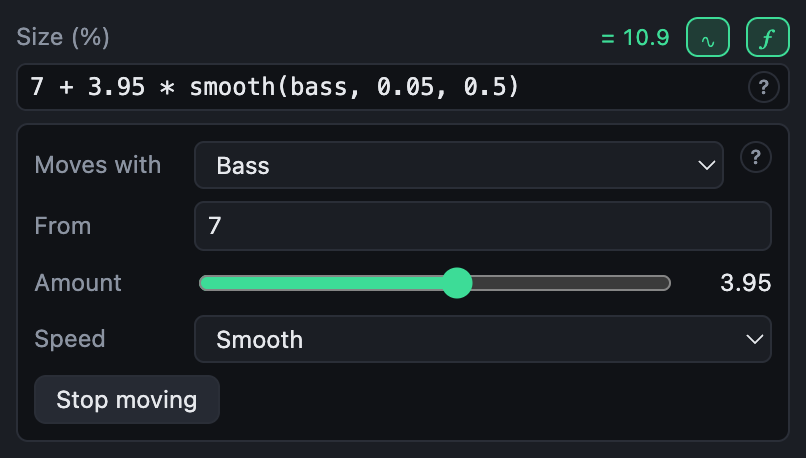
The ∿ button beside a setting opens Moves with. Choose what it follows, how far it goes, and how quickly it reacts.
| Moves with | What it follows |
|---|---|
| Bass, Low mids, Mids, Highs | How loud that part of the sound is |
| Level | How loud the whole sound is |
| Energy | Slowly: high in a drop, low in a breakdown |
| Beat | A kick on each beat, falling away before the next |
| A slow wave | Up and down, once every so many seconds |
| Wandering | Drifting at random, as slowly as you choose |
- From is the value with nothing moving it.
- Amount is how far it goes at the loudest; below zero, it moves the other way.
- Speed: Snappy follows every hit, Smooth rounds them off, Slow follows the music over seconds.
Stop moving puts the setting back to a plain value. What you choose is written as a formula, so it can be fine-tuned with the ƒ button, and read back into Moves with as long as it keeps that form.
Formulas
The ƒ button turns a setting into a formula, such as:
100 + 8 * smooth(bass, 0.02, 0.4)That is 100, plus up to 8 more with the bass, rising in two hundredths of a second and falling over four tenths. While you type, the formula is checked: what is wrong is underlined, with a word on why, and the setting keeps its last good value meanwhile. Beside it is what it comes to right now.

What a formula is made of
| Examples | |
|---|---|
| Numbers | 0.5, 2, .25 |
| Colours | #3ddc97, #3ddc9780 with see-through, #fff |
| Music values | bass, beat, energy, time… see the list |
| Fields | colour1, amount: the template's own fields, by name |
| Arithmetic | + - * /, % (remainder) and ^ (power) |
| Comparisons | < <= > >= == !=, giving 1 or 0 |
| A choice | condition ? this : that, such as portrait ? 12 : 8 |
| Functions | smooth(…), mix(…), lighten(…)… see the reference |
| A constant | pi |
A formula gives a number or a colour, depending on what it is made of: colour1 * 0.5 is a colour, lightness(colour1) a number. Colours do arithmetic part by part, red with red and so on. A switch is on when its formula is not 0.
A few to start from
| Formula | Does |
|---|---|
1 + 0.3 * smooth(beat, 0, 0.3) | Pumps on every kick |
100 * smooth(energy, 1, 3) | Builds up with the energy over seconds |
time * 10 | Turns steadily: 10 degrees a second, as a rotation |
360 * barPhase | Turns once a bar |
mix(colour1, complement(colour1), sine(beats / 8)) | Swings between a colour and its opposite every eight beats |
portrait ? 15 : 9 | A larger size in the vertical shape |
progress < 0.1 ? 1 : 0 | On for the first tenth of the mix only |
smooth(level, 0.05, 0.5) | As an opacity: seen as much as the music is loud |
progress | As a shape's Drawn: a progress bar, or a ring that fills, over the whole mix |
trackProgress | The same over each track, starting again at every track marker |