Tracks and chapters
Marking where each track starts gives the exported files chapters, gives YouTube a track list, and lets a video show the track playing.
Marking tracks
- Press M while the mix plays to mark a track starting at the playhead.
- Drag a marker to move it. Double-click its name to type one in, as Artist - Title.
- Backspace removes the marker last clicked.
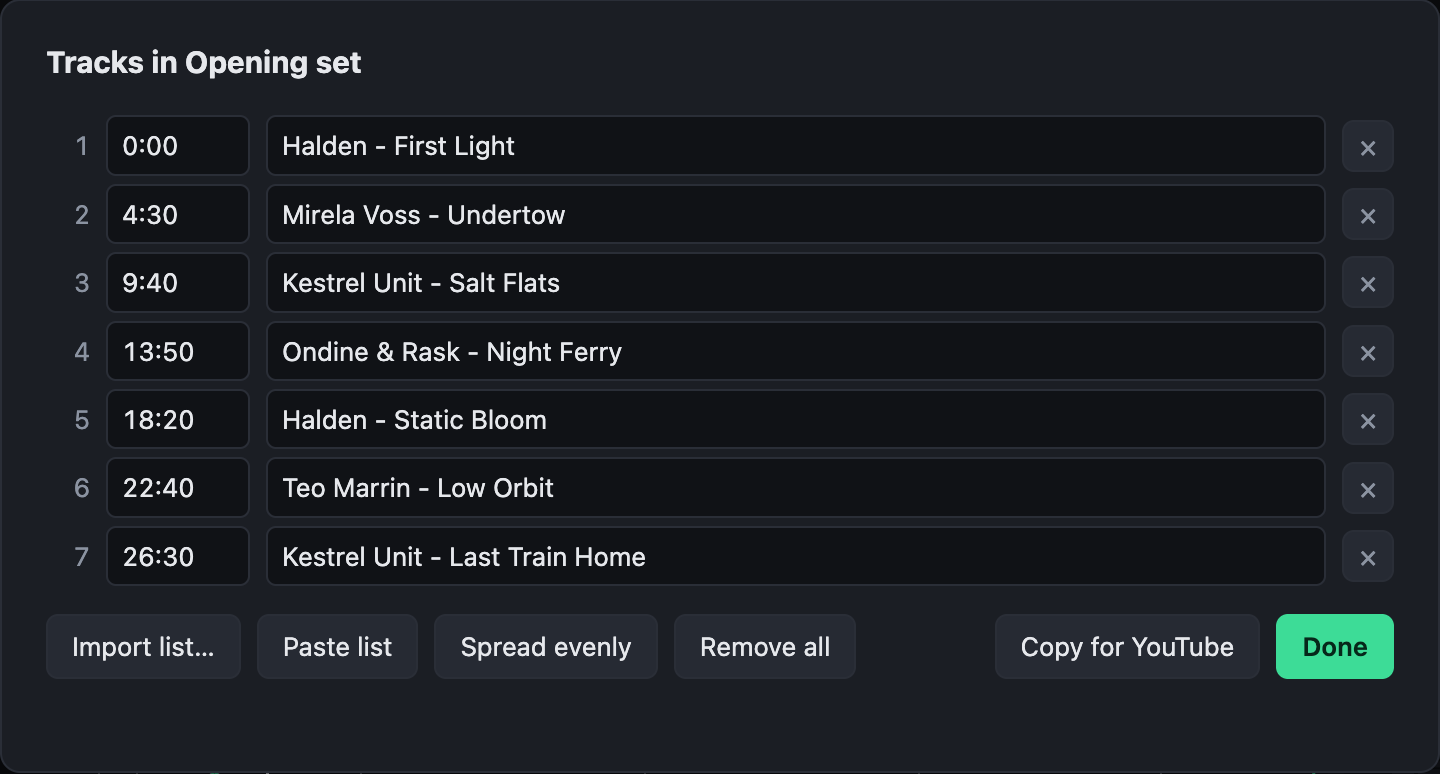
The Tracks button beside the mix's artist lists them all, with their times and names. From there you can:
- Import a list from DJ software: a history or playlist exported as M3U8 or text (rekordbox's, for one), or any list of names. A list without times is spread evenly over the mix as a start, shown dashed until each track has been dragged to where it really begins. A list with times, such as
12:30 Artist - Titleon each line, puts them at those times. - Paste a list from the clipboard.
- Copy for YouTube: the list with times, for the video's description, where YouTube turns it into chapters. It says so if YouTube will not take it: it wants three tracks at least, each ten seconds or more.
Where the tracks go
- MP3, AAC and MP4 exports carry them as chapters, which many players show.
- A video can show the track playing, with
%currentTrack%in a text layer. See Fields.